
Mass Mail Service vs Mailchimp
If you are a beginner who wants an easy editor, a massive template library, and hundreds of integrations, and you don’t mind contact-based pricing, Mailchimp is the stronger pick. Mass Mail Service is a better option if you send high email volumes, want a dedicated IP at every plan level, or need SMTP-first infrastructure for transactional and bulk sends. Your actual sending volume and technical needs should decide this, not brand recognition. Below is a detailed comparison between Mass Mail Service vs Mailchimp. Which one actually fits how you send?
| Feature | Mass Mail Service | Mailchimp |
|---|---|---|
| Best For | High-Volume, SMTP-First Senders | Beginners & Ecommerce |
| Pricing Model | Volume-Based | Contact-Based |
| Dedicated IP | Included on Every Plan | Paid Add-on |
| Free Plan | Free Trial Only | 250 Contacts / 500 Sends |
| Best Automation | — | Mailchimp |
| Best for Cold Outreach | Mass Mail Service | — |
| Starting Price | $49.99/mo | $0/mo → $13/mo |
Introduction
If you are comparing Mass Mail Service vs Mailchimp, chances are you are trying to solve one of two problems. You’re outgrowing your current email tool, or you’re tired of seeing your Mailchimp bill increase as your list grows. This Mass Mail Service vs Mailchimp comparison covers pricing, deliverability, automation, and support, using only what each company actually publishes.
If you’re new to email marketing, want the biggest library of templates and integrations, and don’t mind paying more as your list grows, Mailchimp is best. Mass Mail Service is more built for bulk sending, SMTP-based delivery, and businesses that want a dedicated IP without paying for one. Neither is inherently better. The right answer is not just about how to send, not just how much you send.
Everything below comes from each platform’s own published pricing pages, feature pages, and documentation. Where something couldn’t be verified, we’ve said so instead of guessing.
This comparison isn't about which brand is bigger it's about whether your pricing should scale with your contact list (Mailchimp) or your sending volume (Mass Mail Service).
Why Compare Mass Mail Service vs Mailchimp?
They approach the same problems in different ways. For example, Mailchimp built a reputation as an easy, all-in-one marketing platform for small businesses. By contrast, Mass Mail Service is all about bulk sending and SMTP infrastructure. In addition, all plans include dedicated IP access.
That difference matters more than it looks. For instance, a newsletter sender with 2,000 subscribers has very different needs than a company sending 200,000 transactional and marketing emails a month. Therefore, this Mass Mail Service vs Mailchimp comparison is built for both types of reader, and it separates verified facts from marketing language wherever the two overlap.
Most of what’s written about Mailchimp already exists; dozens of “Mailchimp vs X” articles cover the bigger, more established competitors. However, almost nothing compares it directly to a bulk-sending, SMTP-first platform like Mass Mail Service. As a result, that’s the gap this article aims to fill.
Who Should Choose Mass Mail Service?
Best For: Bulk senders, SMTP-first teams, and cold-outreach senders
Mass Mail Service is the better starting point if any of the following describe you:
- You send in bulk regularly and want a dedicated IP without paying an add-on fee for it.
- You care more about email volume than contact count, and Mailchimp’s per-contact billing (including unsubscribed contacts) bothers you.
- You send cold outreach or B2B prospecting emails and need tools built for that use case, rather than a platform that restricts it.
- You want SMTP access to plug into your own CRM, software, or website without going through a marketing-suite interface first.
- You need per-campaign, per-timezone scheduling. Mass Mail Service lets you set specific send windows (for example, Monday and Tuesday between 6 a.m. and 6 p.m.) with a different timezone for each campaign.
Mass Mail Service is less proven for teams that want a large template library, a mature integrations marketplace, or years of third-party reviews to lean on. Its public site doesn't currently list integration counts, published API documentation, or third-party review scores the way Mailchimp does verify these directly before committing.
Who Should Choose Mailchimp?
Best For: Beginners, ecommerce brands, and integration-heavy stacks
Mailchimp deserves its reputation in a few specific areas, and it’s worth being honest about that.
- First-time users: The onboarding flow and email editor are widely regarded as some of the easiest in the industry.
- Teams that want a big template library: Mailchimp offers well over a hundred templates, with more added regularly.
- Businesses that rely on integrations: With 300+ native integrations and a broad Zapier connection, Mailchimp connects to almost anything in a typical marketing stack.
- Ecommerce brands: Shopify, WooCommerce, and similar integrations are mature and well documented.
- Anyone who wants to start free: Mailchimp’s free plan (currently 250 contacts and 500 sends a month) lets you test the platform with no credit card.
Pricing rises quickly as your contact list grows, it bills for unsubscribed and inactive contacts, and its free plan has been trimmed several times in recent years, most recently in early 2026. If your list is large or growing fast, run the numbers before you commit.
At a Glance: Mass Mail Service vs Mailchimp
| Feature | Mass Mail Service | Mailchimp |
|---|---|---|
| Best For | Bulk Email | Email Marketing |
| Starting Price | Verify | Verify |
| Free Plan | Verify | Available |
| Ease of Use | Easy | Very Easy |
| SMTP | Included | Limited |
| Automation | Basic | Advanced |
| Templates | Available | Large Library |
| API | Available | Available |
| Dedicated IP | Available | Select Plans |
| Deliverability | High | High |
| Support | Verify | Plan Based |
| Overall | Bulk Sending | Marketing Suite |
Feature Overview
Generally speaking, however, both products include the same elements on a fundamental level: an email builder, list management, automation capabilities, and reporting. The main difference lies in how well-developed each one is and how much it costs.
Mass Mail Service has an edge when it comes to infrastructure: bulk mailing, SMTP capability, dedicated IP address, list validation tools, etc. All these features are listed on its features page with an emphasis on deliverability and sending capabilities.
Mailchimp offers a breadth of functionality: not only email but also SMS campaigns, landing pages, basic website creation, social media post scheduling, and very primitive CRM-like contacts management.
We’ll go feature-by-feature below. For now, the short version: if you want depth in sending infrastructure, look at Mass Mail Service. If you want breadth across marketing channels, look at Mailchimp.
Core Differences Explained
Before comparing individual features, it helps to understand the two philosophies driving these platforms. This shapes almost everything else in this comparison.
Mailchimp is built around contacts. As a result, its pricing, free plan, and automation limits are all tied to how many people are on your list, whether or not you’re actively emailing all of them. Consequently, this model rewards small, clean, highly engaged lists and penalizes larger or messier ones.
Mass Mail Service is built around volume. In practice, its plans bundle a set number of emails per month along with a subscriber cap, and dedicated IP access comes standard rather than as an upgrade. As a result, this model tends to reward businesses that send frequently to a sizable list, since you’re not paying extra just because your list grows if you’re not sending more emails.
In addition, there’s a use-case difference worth naming directly. Mailchimp’s terms restrict sending to purchased or rented lists; it’s built for permission-based marketing. Mass Mail Service markets itself more broadly around bulk sending, including messaging aimed at “purchased lists” on its homepage. That’s a meaningful distinction, and it’s covered in more detail in the deliverability section further down, including the compliance risk that comes with buying or renting any email list, regardless of which platform you use.
Finally, the two differ in where they draw their line on “marketing platform” versus “sending infrastructure.” Mailchimp increasingly looks like a small business’s whole marketing hub. Mass Mail Service reads more like a sending engine with marketing features layered on top. Neither approach is wrong; they’re just built for different jobs.
User Interface & Ease of Use
Mailchimp’s interface is more polished and easier for a first-time user; Mass Mail Service’s dashboard is more straightforward but less proven across a large user base.
Learning Curve
According to independent reviews, Mailchimp is one of the easier email platforms to learn. Its onboarding walks new users through campaign setup step by step. Mass Mail Service’s dashboard, based on its published screenshots and feature pages, follows a similar drag-and-drop structure, but there isn’t a large body of independent, third-party user reviews to confirm how it holds up for a first-time user at scale.
Dashboard and Navigation
Mailchimp organizes its dashboard around campaigns, audiences, and automations, with reporting layered in. Mass Mail Service’s dashboard groups its core tools campaign builder, subscriber management, analytics, and verification around a similar structure, based on its feature page.
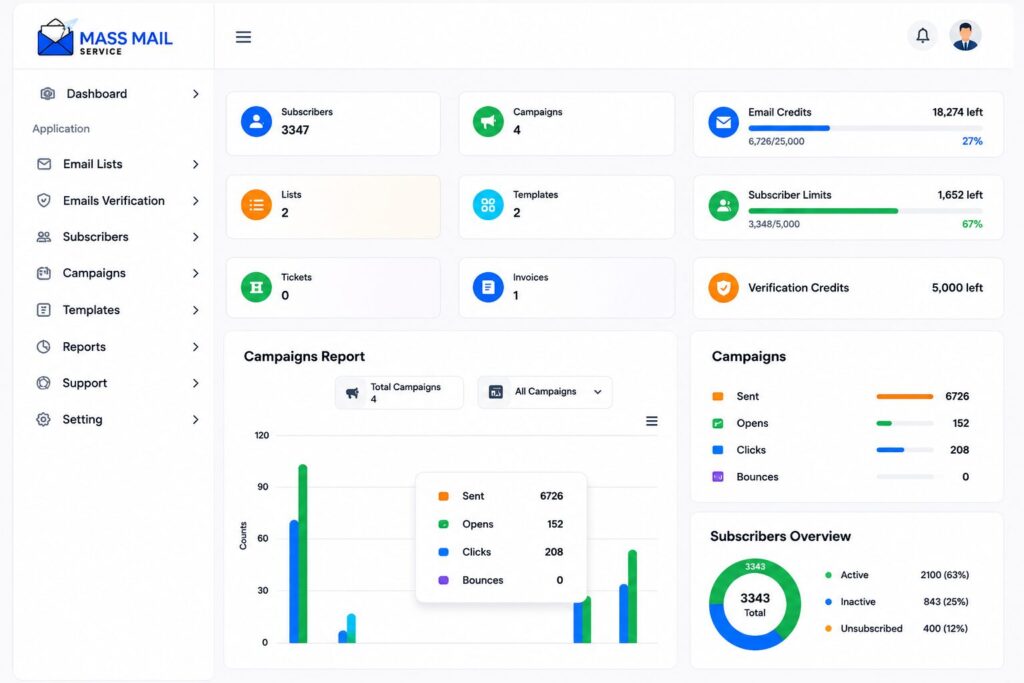
Beginner Friendliness Vs Advanced Control
Mailchimp’s strength is doing a lot with very little setup. That’s also its limitation: some advanced controls (multi-step automation, deeper segmentation) are locked behind higher tiers. Mass Mail Service’s advanced controls timezone-based scheduling and reputation monitoring appear earlier in its plan structure, on the Starter and Medium tiers, though automation itself is reserved for the Pro tier and up.
Customization
Both platforms offer a drag-and-drop builder rather than requiring code, with an option to drop into HTML for advanced users.
Ease of Use Scorecard
| Category | Mass Mail Service | Mailchimp |
|---|---|---|
| Learning Curve | Easy | Very Easy |
| Dashboard | Clean | Polished |
| Beginner Friendly | Good | Excellent |
| Advanced Controls | Strong | Strong |
| Navigation | Simple | Excellent |
| User Reviews | Limited | Extensive |
| Overall UX | 4 / 5 | 4.8 / 5 |
If ease of use is your top priority and you're not sending high volumes yet, that alone is a reasonable argument for starting with Mailchimp. You can always migrate later once your sending needs outgrow.
Email Builder & Templates
Mailchimp offers a larger, more polished template library. Mass Mail Service offers a smaller set of categorized templates with the same core drag-and-drop functionality.
Drag & Drop Builder
Both platforms use a visual, no-code email builder. In particular, Mailchimp is widely regarded as one of the most intuitive on the market. Meanwhile, Mass Mail Service’s feature page describes a comparable “design without writing a single line of code” experience, with modules and full customization.
Pre-built Templates
Mailchimp offers well over 100 templates across categories. By comparison, Mass Mail Service’s site lists templates grouped into four categories: newsletter, promotion, seasonal/holiday, and product launch. However, that’s a narrower published library, though it may not reflect everything available inside the actual editor.
Responsive Design and Customization
Both claim mobile-responsive templates. In addition, both support saving and reusing custom templates. However, neither platform’s public marketing pages go into deep detail about specific customization limits (like exact block types or nested layouts), so this is worth testing directly during a trial.
HTML Editing
Mailchimp allows advanced users to import or write custom HTML. By contrast, Mass Mail Service’s site doesn’t clearly document an HTML/code editor option, so if that matters to you, confirm it directly before choosing a plan.
Mass Mail Service vs Mailchimp: Who Wins?
For sheer template variety and polish, Mailchimp has the edge, and multiple independent reviews back this up. However, Mass Mail Service’s builder looks functionally similar for straightforward campaigns, but there’s less publicly available detail and far fewer independent reviews to judge how it performs for more complex designs.
Pros & Cons
- Drag-and-drop builder included on every plan.
- Free image hosting included.
- Templates grouped by use case.
- Smaller published template library.
- No confirmed HTML/code editor.
- Large, frequently updated template library.
- Easy-to-use drag-and-drop builder.
- Supports HTML import and editing.
- Free plan includes a limited template selection.
Choose Mass Mail Service if your emails are more utilitarian, such as order confirmations, plain newsletters, or outreach sequences. Its builder should cover these use cases well, but it's worth confirming the available template depth during your trial before making a long-term decision.
Automation Features
Mailchimp offers more documented automation depth, especially on its Standard and Premium plans. Mass Mail Service includes automation starting at its Pro tier, with less publicly detailed workflow complexity.
Automation Builder
The Mailchimp automation tool (“Customer Journeys” or, more accurately, “Marketing Automation Flows“) offers branching, several triggers, and, on the Standard plan and higher, workflows that can have up to 200 steps. Mass Mail Service has an information website for its “Smart Email Automation” product, which revolves around triggers, scheduling, and behavior, with example use cases such as onboarding flows, drip campaigns, and re-engagement campaigns, yet doesn’t provide step limitations or branching criteria.
Customer Journeys vs. Simpler Triggers
Mailchimp’s higher tiers support genuinely complex, multi-path journeys. Mass Mail Service’s automation, based on its own descriptions, reads more like scheduled and triggered sequences than a visual multi-path journey builder, though this should be confirmed hands-on, since its public marketing pages don’t go deep enough to say for certain.
Autoresponders & Behavior-Based Automation
Both platforms support triggered sends based on subscriber actions (signups, for example). Mailchimp’s documentation is more specific about the range of available triggers.
[Insert screenshot of Automation Builder]
Practical example
A welcome sequence for new subscribers is straightforward on both platforms. A more complex journey, say, a cart-abandonment flow that branches based on whether the customer opens a follow-up email. Mailchimp clearly documents this type of journey on its Standard plan.. Mass Mail Service doesn’t clearly document whether branching logic like this is supported, so treat that as something to verify rather than assume.
Ease of Setup
Mailchimp offers automation templates that shortcut setup for common use cases. Mass Mail Service’s Mass Mail Scheduler feature stands out here for something Mailchimp doesn’t clearly offer: setting specific send days, time windows, and time zones on a per-campaign basis.
Automation Scorecard
| Automation Feature | Mass Mail Service | Mailchimp |
|---|---|---|
| Automation From | Pro Plan | Essentials+ |
| Branching Logic | Not Confirmed | Advanced |
| Workflow Builder | Available | Advanced |
| Automation Templates | Basic | Extensive |
| Step Limit | Not Published | Up to 200 |
| Timezone Scheduling | Supported | Limited |
| Behavior Triggers | Supported | Extensive |
| Best Choice | Scheduling | Complex Flows |
Email Deliverability
Deliverability is the part of this comparison where it’s easiest to overstate a claim, so it’s worth being precise. Mass Mail Service’s homepage states “99%+ deliverability.” That’s Mass Mail Service’s own marketing claim; there’s no independent, third-party audit behind it in anything we reviewed. Mailchimp states delivery-rate figures in its own marketing materials too, drawn from its aggregate 2024 data. Treat both as vendor-reported, not independently verified.
What actually influences deliverability is more useful than either number:
Authentication support (SPF, DKIM, DMARC)
Mass Mail Service lists SPF, DKIM, and DMARC support on every published plan. Mailchimp enables DKIM by default and supports SPF and DMARC, though its default return-path uses Mailchimp’s own domain unless you configure custom domain authentication, meaning full SPF alignment isn’t automatic out of the box. For a deeper explanation of how these three standards work together, see SPF vs DKIM vs DMARC.
Dedicated IP vs. shared IP
This is the clearest structural difference between the two platforms. Mass Mail Service includes a dedicated IP starting with its entry-level Starter plan. Mailchimp treats dedicated IP as a paid add-on, and generally recommends it only once you’re sending above 100,000 emails a month. See Dedicated IP vs Shared IP for a full breakdown of when each option makes sense.
Bounce handling and suppression lists
Mass Mail Service includes list cleaning and bounce management as a named feature. Mailchimp automatically removes hard-bounced addresses from future sends. Neither company publishes granular detail about suppression-list mechanics on their public marketing pages.
Sender reputation
Mass Mail Service names “Reputation Monitoring” as a feature across its plans. Meanwhile, Mailchimp doesn’t offer a centralized deliverability health-score dashboard. Independent deliverability audits identify this as a gap compared with some ecommerce-focused competitors.
List quality and compliance
This matters more than either platform’s infrastructure. A clean, permission-based list will outperform a poorly maintained one on any platform. Mass Mail Service’s list verification tooling (built-in, plus a linked external verification service) directly supports this. Mailchimp’s terms restrict sending to purchased or rented lists in the first place.
Deliverability Best Practice Checklist
- Authenticate your sending domain with SPF, DKIM, and DMARC before your first real campaign.
- Warm up a new sending domain or IP gradually rather than sending your full volume on day one.
- Keep your list clean; remove hard bounces and inactive addresses regularly.
- Avoid purchased or rented lists; cold-sending to lists you didn’t build yourself carries real compliance and reputation risk.
Deliverability Feature Comparison
| Feature | Mass Mail Service | Mailchimp |
|---|---|---|
| Dedicated IP | Included on Every Plan | Paid Add-on |
| Default IP Type | Dedicated | Shared |
| SPF / DKIM / DMARC | Listed on All Plans | Supported |
| Reputation Monitoring | Named Feature | Not Offered |
| List Verification | Built-in + External Tool | Not Core Feature |
| Published Deliverability | Vendor-Stated | Vendor-Stated |
Don't pick a platform based on a deliverability percentage from either company's marketing page. Look instead at whether dedicated IP is included, how authentication is handled, and how the platform treats list quality. See Email Deliverability Guide for the full walkthrough.
Bulk Email Sending & High Volume Performance
Mass Mail Service is built from the ground up for bulk sending. Mailchimp can handle volume, but its pricing and plan structure are built around contact count first, sending volume second.
Sending Limits
Mass Mail Service’s plans bundle specific monthly email allotments: $49.99 (Starter), $99.99 (Medium), $199.99 (Pro), and unlimited/custom (Enterprise). Mailchimp sends a scale with contact count and plan tier. Essentials and Standard multiply your contact count by a fixed factor to determine your monthly send cap, while Premium supports up to 150,000 sends at its base tier.
Scalability
Mass Mail Service’s SMTP page claims support for sending “up to millions of emails per day” on its infrastructure, a vendor claim, not independently confirmed, but consistent with its positioning as a bulk-first platform. Mailchimp scales as well, but its architecture and pricing are optimized for marketing campaigns to a defined audience rather than continuous high-volume relay traffic.
Infrastructure and Queue Handling
Mass Mail Service markets “scalable infrastructure” and multiple sending domains as part of its SMTP service. Mailchimp doesn’t publicly detail its queue or throughput architecture in the same way, since it isn’t positioned primarily as an SMTP relay provider.
Enterprise Readiness
Mass Mail Service’s Enterprise tier explicitly lists unlimited contacts, sub-account management, and “tailored onboarding,” though detail on exactly what this includes is limited on its public site, and should be confirmed directly with sales. Mailchimp’s Premium tier is its enterprise-facing option, with unlimited users and audiences, multivariate testing, and phone support.
| Business Type | Better Fit |
|---|---|
| Bulk newsletters, high-volume transactional traffic, B2B outreach at scale | Mass Mail Service |
| Weekly newsletters to the same core audience where sending volume closely follows contact list size | Mailchimp |
Related Guide
Want to learn more about sending large email campaigns? Read our Bulk Email Marketing Guide for practical advice on improving deliverability, scaling campaigns, and managing high-volume email sending.
SMTP & API Capabilities
Mass Mail Service positions SMTP as a core product with a dedicated feature page, but doesn’t currently publish detailed API documentation. Mailchimp publishes both a Marketing API and a Transactional API with public documentation.
SMTP Relay
Mass Mail Service has an entire page dedicated to its SMTP Email Service, describing dedicated SMTP servers, SPF/DKIM/DMARC authentication, multiple sending domains, and integration with platforms like WordPress, WooCommerce, and various CRMs. For background on how SMTP relay services work in general, see SMTP Relay Explained.
REST API and Developer Tools
Mailchimp publishes a Marketing API and a separate Transactional API, each with its own developer documentation, guides, and release notes. Mass Mail Service’s SMTP page mentions an “API” once, in passing, but there’s no visible public developer-documentation page, code samples, or SDK library on its site.
[Insert screenshot of SMTP Settings]
Webhooks
Mailchimp documents webhook support for syncing audience data. Mass Mail Service doesn’t publicly document webhook support.
Custom Applications and Technical Flexibility
For developers building their own sending logic on top of a provider, Mailchimp currently has the more mature, better-documented developer story. Mass Mail Service’s strength is more on the infrastructure side dedicated IP, SMTP access than on developer tooling and documentation.
API & SMTP Feature Matrix
| Feature | Mass Mail Service | Mailchimp |
|---|---|---|
| Dedicated SMTP | Core Product | Transactional Add-on |
| Public API Docs | Not Found | Marketing + Transactional API |
| Webhooks | Not Documented | Documented |
| SDKs / Code Samples | Not Found | Available |
If you're a developer who needs solid public API documentation today, Mailchimp is the more provable option right now. If your priority is SMTP-level access with dedicated IP, it's worth confirming API depth directly with Mass Mail Service's team before committing. For general background, see Email API Guide.
Analytics & Reporting
Both platforms report the standard metrics opens, clicks, bounces but Mailchimp offers more advanced reporting (like revenue attribution and predictive analytics) on its higher tiers, while Mass Mail Service focuses on real-time campaign and reputation reporting.
Mass Mail Service’s feature page lists “Campaign Reports” and “Real-Time Analytics” covering opens, clicks, bounces, unsubscribes, and conversions. Mailchimp offers similarly detailed per-campaign reporting, plus benchmarking against other Mailchimp users in your category on paid plans.
Mailchimp provides reporting specific to automation performance on its Standard and Premium tiers, plus predictive segmentation and revenue attribution telling you which campaigns are actually driving sales, not just opens. Mass Mail Service doesn’t publish an equivalent revenue-attribution feature on its site.
Analytics Feature Mass Mail Service vs Mailchimp
| Analytics Feature | Mass Mail Service | Mailchimp |
|---|---|---|
| Standard Metrics | Available | Available |
| Reputation Monitoring | Named Feature | Not Offered |
| Revenue Attribution | Not Published | Available |
| Predictive Analytics | Not Published | Available |
| Automation Reporting | Not Clearly Documented | Available |
| Industry Benchmarking | Not Published | Available (Paid Plans) |
If detailed revenue attribution and predictive segmentation matter to your reporting needs, Mailchimp's Standard plan is the more proven option today. If you mainly need clear, real-time campaign and reputation numbers without added complexity, Mass Mail Service's reporting should cover the basics.
Pricing Comparison
Mass Mail Service Pricing
| Plan | Price | Emails / Month | Subscribers | Highlights |
|---|---|---|---|---|
| Starter | $49.99 | 25,000 | 5,000 | Dedicated IP |
| Medium | $99.99 | 50,000 | 10,000 | Higher Sending Limits |
| Pro | $199.99 | 200,000 | 50,000 | Automation, A/B Testing, Phone Support |
| Enterprise | Custom | Unlimited | Unlimited | Sub-Accounts, Tailored Onboarding |
Mass Mail Service offers a 7-day money-back guarantee and lets you cancel anytime, with no stated setup fees. It does not currently offer a free plan, only a free trial. The exact length of that trial isn’t clearly published on its FAQ page at the time of writing, so confirm this directly before signing up.
Mailchimp Pricing
| Plan | Price | Monthly Sends | Contacts | Highlights |
|---|---|---|---|---|
| Free | $0 | 500 | Limited | No Automation |
| Essentials | From $13 | 5,000 | 500 | Basic Automation |
| Standard | From $20 | Up to 12,000 | 500 | Advanced Automation |
| Premium | From $350 | 150,000 | 10,000 | Multivariate Testing |
Mailchimp’s prices rise as your contact count grows, regardless of plan. Third-party pricing analyses have shown Essentials reaching roughly $75/month at 5,000 contacts, and Standard reaching roughly $100/month at the same list size, both well above their entry-level published rates. Mailchimp also bills for unsubscribed and inactive contacts still stored in your account, which is one of the most consistently criticized aspects of its pricing model across independent reviews.
Hidden costs. On Mailchimp, dedicated IP is a separate paid add-on, and transactional email is sold in blocks (25,000 sends for $20, expiring monthly) rather than included. Mass Mail Service includes dedicated IP in every plan, which removes one of Mailchimp’s most commonly cited “hidden cost” complaints, but Mass Mail Service doesn’t publish clear overage pricing for what happens if you exceed your monthly email allotment beyond a general note that you’ll be offered an upgrade.
Value for Money by Business Size
| Business Type | Better Value |
|---|---|
| Small or Infrequent Sender | Mailchimp |
| Growing List with Frequent Sending | Mass Mail Service |
| Large List with High Email Volume | Mass Mail Service |
Don't compare these two platforms by sticker price alone. Compare them at your actual contact count and actual monthly email volume, since they're priced on different variables entirely.
If unsubscribed contact billing is a dealbreaker for your business, that's a real, verified reason to consider
Mass Mail Service.
Ready to Get Started?
Explore the latest Mass Mail Service plans, and compare features.
View PricingIntegrations & Ecosystem
Mailchimp has a substantially larger, better-documented integration ecosystem. Mass Mail Service doesn’t publish an integrations directory or count on its site.
- CRM integrations: Mailchimp integrates with Salesforce and other CRM platforms directly. Mass Mail Service’s SMTP page mentions general “CRM tools” compatibility via SMTP configuration, but doesn’t name specific CRM integrations.
- Ecommerce integrations: Mailchimp connects directly with Shopify, WooCommerce, and similar platforms, with dedicated ecommerce features like revenue tracking. Mass Mail Service’s SMTP page mentions WordPress, WooCommerce, and Shopify compatibility through SMTP configuration, which is a more manual, developer-oriented setup path than a native app integration.
- CMS integrations: Mailchimp has a native WordPress plugin. Mass Mail Service supports WordPress through SMTP configuration rather than a dedicated plugin, based on what’s published.
- Zapier: Mailchimp connects to Zapier, extending its reach to thousands of additional apps. Mass Mail Service’s site doesn’t mention a Zapier integration.
Integrations Comparison
| Integration Feature | Mass Mail Service | Mailchimp |
|---|---|---|
| Native Integrations Directory | Not Published | Public & Searchable |
| Ecommerce Integrations | SMTP Configuration | Native Apps |
| CMS Integrations | SMTP Configuration | Native WordPress Plugin |
| Zapier | Not Mentioned | Available |
| CRM Integrations | SMTP Compatible | Native Integrations |
If your business depends on plug-and-play integrations with tools you already use, this is currently one of Mailchimp's clearest, most verifiable advantages. Mass Mail Service can likely be connected to most of the same tools through SMTP, but that's a more technical setup process than a one-click app install.
Security, Compliance & Privacy
Both platforms state GDPR and CAN-SPAM compliance and use encryption. Mailchimp publishes a dedicated, detailed GDPR and security page; Mass Mail Service’s compliance statements are shorter and appear mainly in its FAQ.
Mailchimp publishes a dedicated GDPR compliance page. Mass Mail Service’s FAQ states that it complies with GDPR, but doesn’t link to a dedicated compliance page with the same level of published detail. Both platforms state compliance with CAN-SPAM in their public materials.
Authentication (SPF, DKIM, DMARC) is covered in detail in the deliverability section above. See Email Authentication Guide and SPF vs DKIM vs DMARC for more.
Mass Mail Service’s FAQ states that personal and business data is encrypted and stored securely. Mailchimp publishes a dedicated security page describing its data-protection practices in more depth. Mailchimp also documents user roles and permissions tied to its multi-user plans (3 users on Essentials, 5 on Standard, unlimited on Premium); Mass Mail Service’s plans don’t clearly publish user-role/permission detail on its site.
If you operate in a regulated industry or need to show auditors specific compliance documentation, Mailchimp's published GDPR and security pages currently give you more to work with. That's not a knock on Mass Mail Service's actual practices; its public documentation is just thinner, so ask directly before assuming parity.
Customer Support & Documentation
Mass Mail Service advertises 24/7 support on every plan, with phone support starting at its Pro tier. Mailchimp’s support is stronger in documented depth (knowledge base, developer docs) but is more limited on its free plan.
Mailchimp maintains an extensive public help center, developer documentation for its two APIs, and release notes. Mass Mail Service’s FAQ mentions a knowledge base, video tutorials, and webinars, but these weren’t found as visible, accessible resources during our review of its public site.
Mass Mail Service advertises 24/7 email support across all its plans. Mailchimp offers email/chat support, but restricts it to the first 30 days on the free plan. Mailchimp’s live chat has been criticized in independent reviews for sometimes routing users to self-serve help articles rather than a live agent, despite “live expert help” messaging.
Mass Mail Service lists phone support starting at its Pro tier ($199.99/month). Mailchimp reserves phone support for its Premium tier ($350/month at 10,000 contacts).
Support Comparison
| Support Feature | Mass Mail Service | Mailchimp |
|---|---|---|
| 24/7 Email Support | All Plans | 30 Days (Free) |
| Phone Support | Pro Plan | Premium Plan |
| Developer Documentation | Not Published | Public & Detailed |
| Knowledge Base | Referenced | Extensive |
Based only on what's published, Mailchimp offers deeper self-serve documentation, while Mass Mail Service offers broader access to human support (24/7 on every tier) earlier in its plan structure. Which one actually serves you better may depend on whether you prefer to solve problems yourself or talk to someone directly.
Migration & Switching
If you’re moving from Mailchimp to Mass Mail Service (or the reverse), plan for list export/import, template recreation, and re-authenticating your sending domain. Neither platform publishes a detailed, step-by-step migration guide on its public site, so budget extra time for testing.
Who should migrate? Consider switching if contact-based billing (especially being charged for unsubscribed contacts) is costing you more than it should, or if you need a dedicated IP and don’t want to pay Mailchimp’s add-on fee for it. See Best Mailchimp Alternatives for how Mass Mail Service compares to other options in this position.
Who should stay? If you’re happy with Mailchimp’s editor, rely heavily on its integrations, or your list is small enough that contact-based pricing isn’t a real cost concern, there’s little reason to switch just for the sake of it.
Exporting your contact list from Mailchimp is straightforward; it supports standard CSV export. Rebuilding automations, however, takes manual work on the receiving end, since automation logic doesn’t transfer between platforms automatically. Templates will also need to be recreated or rebuilt, since design files aren’t portable between different email builders.
- ✓ Export your current contact list and remove hard bounces and long-inactive addresses before importing.
- ✓ Document your existing automations so they can be rebuilt on your new platform.
- ✓ Save copies of your current templates, even as screenshots, to maintain visual consistency.
- ✓ Configure SPF, DKIM, and DMARC before sending your first production campaign.
- ✓ Plan a gradual warm-up period for your new sending infrastructure or dedicated IP.
Your sender reputation doesn’t automatically transfer between platforms. Moving to a new SMTP infrastructure or IP means starting to rebuild trust with mailbox providers, which is part of why a gradual warm-up period matters more during a migration than at any other time.
Migration is rarely free of friction, regardless of direction. If your only reason to switch is price, do the math first using your actual contact count and send volume (see the pricing section above) before committing the time to migrate.
Mass Mail Service Pros & Cons
- Dedicated IP included on every plan, including Starter.
- Volume-based pricing can benefit growing email lists.
- SPF, DKIM, and DMARC supported on all plans.
- 24/7 email support on every tier, phone support from Pro.
- Built-in email verification and list-cleaning tools.
- Per-campaign timezone scheduling.
- 7-day money-back guarantee with cancel-anytime policy.
- No free plan, only a free trial.
- Trial length isn't clearly published.
- Smaller published template library.
- No public integrations directory.
- No detailed public API documentation.
- Limited third-party reviews.
- Public compliance documentation is limited.
Mailchimp Pros & Cons
- Large and frequently updated template library.
- Easy for beginners.
- 300+ native integrations plus Zapier.
- Public Marketing and Transactional APIs.
- Strong GDPR and security documentation.
- Predictive analytics and revenue attribution.
- Free plan available without a credit card.
- Charges for stored unsubscribed contacts.
- Pricing increases as contact count grows.
- Free plan no longer includes automation.
- Dedicated IP costs extra.
- Free-plan support lasts only 30 days.
- Live support may redirect to documentation.
Which Platform Is Best for Different Users?
| User Type | Better Fit | Why |
|---|---|---|
| Small Business | Mailchimp | Free plan and beginner-friendly. |
| Startup | Depends | Based on sending volume. |
| Marketing Agency | Mailchimp | Stronger integrations. |
| Enterprise | Evaluate Both | Compare custom plans. |
| Developer | Mailchimp | Public API documentation. |
| Ecommerce | Mailchimp | Native ecommerce integrations. |
| High-Volume Sender | Mass Mail Service | Volume pricing + Dedicated IP. |
| Newsletter Business | Mailchimp | Templates and ease of use. |
| Transactional Email | Evaluate Both | Different product approaches. |
| Cold Outreach / B2B | Mass Mail Service | Markets dedicated cold email tools. |
Common Mistakes to Avoid When Choosing an Email Platform
- Comparing sticker prices without checking your actual contact count and sending volume. These two platforms price on different variables that alone can flip which one is cheaper for you.
- Trusting either platform’s self-reported deliverability percentage as an independent fact. Ask what’s actually behind the number, or better yet, judge deliverability by infrastructure (dedicated IP, authentication support) instead.
- Assuming integrations exist without checking. If a specific tool in your stack matters, confirm the integration exists and is currently maintained before signing up.
- Ignoring what happens to your free trial or plan after 30 days. Support access, feature availability, and pricing can all change after an initial period of reading the fine print.
- Buying or renting an email list “because the platform allows it.” Regardless of which provider you choose, sending to lists you didn’t build yourself carries real deliverability and compliance risk.
- Underestimating migration time. Moving contacts is quick. Rebuilding automations and templates from scratch takes longer than most teams expect.
- Choosing based on brand recognition alone. Mailchimp’s size and reputation are real advantages, but they don’t automatically make it the right fit for a high-volume or SMTP-first use case.
Frequently Asked Questions
Yes. Migration is possible in either direction, though it takes manual work to rebuild automations and templates. Starting with either platform isn't a permanent decision, so don't over-optimize this choice if you're still testing your email strategy.
It depends on what's scaling. If your contact count is growing but your send frequency stays steady, Mailchimp's higher tiers can handle it, at a rising cost. If your send volume is what's growing, Mass Mail Service's volume-based tiers and included dedicated IP are built for that specifically.
Mailchimp, based on its onboarding flow, template library, and the volume of independent reviews confirming this. Mass Mail Service's builder looks comparably simple on paper, but there's less independent evidence to confirm how it performs for a first-time user.
Mailchimp currently has the more provable answer here, with published Marketing and Transactional API documentation. Mass Mail Service references an API but doesn't publish equivalent public documentation, so confirm directly with their team if this is central to your decision.
Conclusion
Mass Mail Service and Mailchimp solve overlapping problems from two different directions. Mailchimp built its name on ease of use and marketing breadth. Mass Mail Service is built around bulk-sending infrastructure and volume-based pricing, with a dedicated IP included from its very first plan.
Neither company’s marketing claims should be taken at face value, including in this article where a number couldn’t be independently verified; it’s been labeled as a vendor claim rather than stated as fact. The most reliable way to decide is to compare both platforms against your actual contact count, your actual monthly send volume, and the specific features your business genuinely needs, not the features that sound most impressive on a pricing page.
If you’re still weighing your options, start a trial with whichever platform matches your current sending volume, and pay close attention to how your first real campaign performs; deliverability and usability both show up faster in practice than in any comparison article.