
Best Bulk Email Tools
The Best Bulk Email Tools for bulk mailing are characterized by three key factors: the delivery success, cost-performance ratio, and user-friendly segmentation and automation. Mass Mail Service allows you to benefit from a dedicated IP address and email authentication right away, while Mailtrap provides advanced developer support by providing both SMTP and API access.
Brevo is ideal for scaling small businesses that want to save on costs, while Omnisend caters exclusively to online shops, offering specialized solutions. The following section reviews each tool’s qualities, exploring the details of their advantages and disadvantages.
All data in this article has been collected from the official websites of the discussed services or other third-party resources. Wherever there is a possibility for the figures to change, this is noted outright, as is the case with many yearly plans.
What are “Mass Email Tools” really mean?
Before comparing the best bulk email tools, it helps to separate three things that often get lumped under the same label.
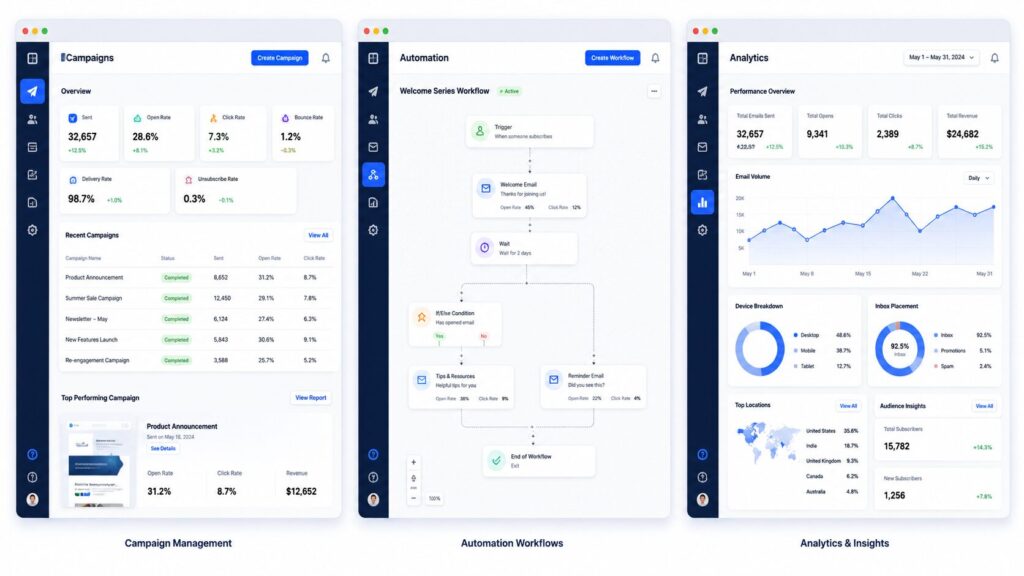
The first is simple: one message, sent to everyone on your list at once. Newsletters, promotions, transactional emails, announcements, it all fits here. Most platforms build on top of this with automation, segmentation, drip sequences, and behavior-based personalization.
Cold or sales email is a different entirely. Each message goes out one at a time, personalized per recipient, usually through a dedicated outreach tool rather than a bulk sender.
So bulk sending and email marketing usually live in the same platform. Cold email almost never does. That overlap is exactly why so many comparison articles blur the lines, and why picking the right tool gets confusing fast. A marketer, a developer, and a sales rep are all searching for “bulk email tools” but each one actually needs something different.
How We Compared These Best Bulk Email Tools
We evaluated every platform based on:
• Deliverability
• Pricing
• Automation
• Ease of use
• Dedicated IP
• Authentication support
Bulk Sender Requirements (Section Most Guides Skip)
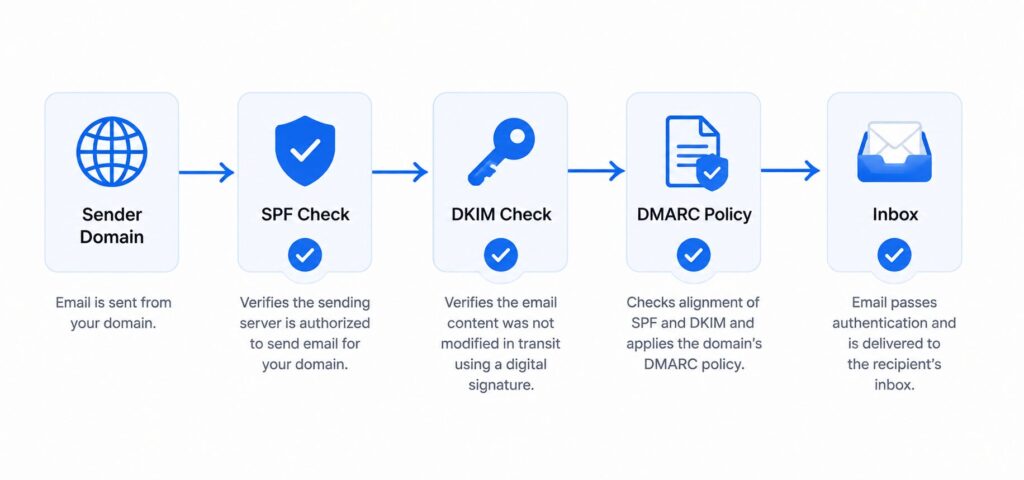
All of the tools below will help you set up SPF, DKIM, and DMARC, or walk you through the process. Just make sure to verify it yourself before signing up, as it is more important than most other features.
For a more in-depth look at each of these protocols, see SPF vs DKIM vs DMARC and Email Deliverability Guide.
| Tool | Best For | Free Plan | Starting Price | Dedicated IP |
|---|---|---|---|---|
| Mass Mail Service | Deliverability-first automation | No | $49.99/mo | Included from entry tier |
| Brevo | Budget-friendly all-in-one | Yes (300/day) | $9/mo | Add-on |
| Mailtrap | Developers, SMTP + Bulk Stream | Yes (4,000/mo) | $15/mo | Higher tiers |
| Omnisend | Ecommerce | Yes (500/mo) | $16/mo | Pro Plan |
| ActiveCampaign | Advanced Automation + CRM | No | $15/mo | Add-on |
| Amazon SES | Lowest Cost at Scale | Yes (Limited) | $0.10 / 1,000 Emails | Add-on |
| Sender | Startups, Generous Free Tier | Yes (15,000/mo) | $7/mo | Higher Tiers |
| Kit | Newsletter Creators | Yes (10,000 Subs) | $39/mo | Not Offered |
The Best Bulk Email Tools
1. Mass Mail Service (Best Overall for Deliverability First Bulk Sending)
Companies that want a dedicated IP, complete email authentication, and automation in one platform without stitching together separate SMTP, campaign sending, and list-cleaning tools should consider Mass Mail Service. Instead of relying on multiple services, the platform focuses on helping bulk email reach the inbox reliably.
- 25,000 Emails
- 5,000 Subscribers
- Dedicated IP
- 50,000 Emails
- 10,000 Subscribers
- Dedicated IP
- 200,000 Emails
- Automation
- A/B Testing
- Dedicated IP
- Unlimited Contacts
- Custom Sending
- Enterprise Features
- Dedicated Support
- Dedicated IP and full authentication included even in the entry-level account
- Provides SMTP, automation, campaign management, and analytics in one solution
- 24/7 customer support is available for all plans
- Money back guarantee within a week
- Independent deliverability benchmark is unavailable.
- The starting point is higher than Brevo, Sender, and Moosend’s
- Email verification is not a native feature but a connected tool
2. Brevo (Best Budget-Friendly All-in-One Platform)
Teams that require email, SMS, and simple CRM capabilities without investing in three separate subscriptions. Brevo prices by email volume rather than contact count, which helps if your list is large but you don’t email everyone constantly.
- 300 Emails / Day
- No Contact Limit
- Basic Features
- 5,000 Emails
- Email Campaigns
- Shared IP
- A/B Testing
- Phone Support
- Advanced Features
- Generous free plan with no contact limits
- Multi-channel: Email, SMS, and WhatsApp
- Affordable automation at a comparable volume to similar services
- Reporting tools are only available on higher-tier plans
- Dedicated IP address is an add-on, not included in the base subscription
3. Mailtrap (Best for Developers and High-Volume Senders)
Product teams that want to run a bulk sending stream alongside transactional email delivery, while also having direct API access, will benefit most from Mailtrap.
- 4,000 Emails / Month
- 100 Contacts
- Email Testing
- 10,000+ Emails
- Bulk Sending
- Shared IP
- Dedicated IP
- Warm-up Included
- Advanced Sending
- Having separate infrastructure for transactional and bulk e-mails
- Developer-friendly XDK
- ISO 27001-certified, SOC 2-certified infrastructure
- Pricing jumps significantly from the Basic to Business plan
- Focus on marketing e-mail features instead of developer tools
4. Omnisend (Best for Ecommerce Bulk Sends)
Shopify, WooCommerce, and BigCommerce stores running product-focused email campaigns are the best fit for Omnisend.
Omnisend connects directly to your online store; it automatically syncs product and order data. As a result, you can build bulk email campaigns with product blocks, cart recovery, post-purchase follow-ups, and other automated workflows without manual setup.
- 500 Emails / Month
- 250 Contacts
- Basic Features
- 6,000 Emails
- Email Marketing
- Shared IP
- Unlimited Emails
- Advanced Automation
- Priority Support
- Deep ecommerce integration and prebuilt segments
- SMS and push notifications included with email
- Gamified opt-in forms (spin-the-wheel, scratch cards)
- Not as useful for non-ecommerce purposes
- Limited free-tier sending quota compared to Brevo or Sender
5. ActiveCampaign (Best for Advanced Automation)
Teams looking for conditional multi-branch automation combined with a lightweight CRM will find ActiveCampaign a strong fit.
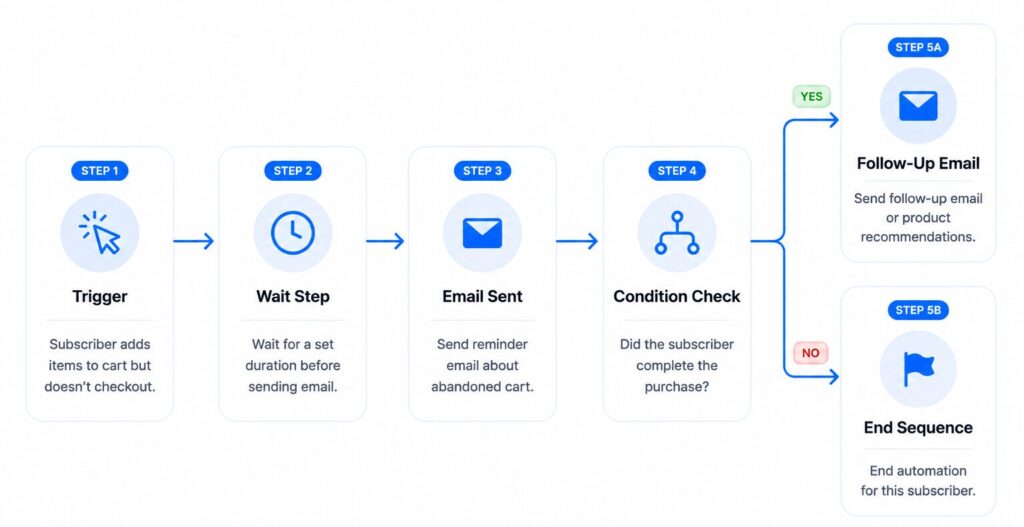
One of its biggest strengths is the advanced automation builder. Unlike many competitors, it supports branching logic, wait steps, split testing, and other sophisticated workflow options.
- 1,000 Contacts
- Email Marketing
- Core Automation
- Advanced Automation
- CRM Features
- E-commerce Integrations
- Premium Automation
- Advanced Reporting
- E-commerce Features
- Strong conditional-logic automation
- Built-in CRM and pipeline tracking
- Solid deliverability performance in independent tests
- No free plan
- Steeper learning curve than most tools on this list
6. Amazon SES (Best for Rock-Bottom Cost at Scale)
Developers who are comfortable managing their own infrastructure and want the lowest possible cost per email will find Amazon SES a strong choice. At just $0.10 per 1,000 emails on a shared IP, Amazon SES is difficult to beat on price alone.
- Per 1,000 Emails
- AWS Infrastructure
- Pay-as-you-go Pricing
- Private IP Address
- Separate Sender Reputation
- Paid Add-on
- Very low cost per email
- Can scale up easily to large volumess
- Has suppression list and reputation management
- Lacks any marketing tools like templates or segmentation
- Needs technical expertise to set up and manage
7. Sender (Best Free Plan for Startups)
Early-stage businesses that need a generous free plan while building their email list will find Sender a strong choice. To support growing businesses, Sender’s free plan includes up to 15,000 emails per month for 2,500 subscribers, making it one of the most generous free tiers available.
- 15,000 Emails / Month
- Free Forever
- Perfect for Startups
- Paid Plan
- Additional Features
- Higher Sending Limits
- Advanced Features
- Professional Tools
- Business Ready
- Very attractive free plan
- 24/7 customer support even on the free plan
- SMS campaigns are available for omnichannel marketing
- No separate sending stream for transactional and marketing emails
- Brand visibility in the free plan is limited to the sender’s brand
8. Kit (formerly ConvertKit - Best for Newsletter Creators)
Independent creators and newsletter publishers who prioritize audience growth over polished design will find Kit a great fit. Instead of focusing on heavily branded templates, Kit uses a simple, text-first editor that helps newsletters feel more personal and authentic.
- 10,000 Subscribers
- Limited Automation
- Creator Tools Included
- Advanced Automation
- Monetization Features
- Priority Creator Tools
- The generous free plan option for a significant number of subscribers
- Various monetization options
- Flexibility in terms of tagging system for segmentation
- Very limited customization of the design
- The only possibility for A/B testing is subject line testing.
Price Per 1,000 Emails: The Number Most Comparisons Skip
| Tool | Plan | Monthly Price | Emails Included | Cost per 1,000 Emails |
|---|---|---|---|---|
| Amazon SES | Pay-as-you-go | Usage-based | N/A | $0.10 |
| Mailjet | Free | $0 | 6,000 | $0 |
| Sender | Standard | $7 | 12,000 | ~$0.58 |
| Brevo | Starter | $9 | 5,000 | ~$1.80 |
| Postmark | Basic | $15 | 10,000 | ~$1.50 |
| Mailtrap | Basic | $15 | 10,000 | ~$1.50 |
| Mass Mail Service | Starter | $49.99 | 25,000 | ~$2.00 |
How to Choose the Right Best Bulk Email Tools for Your Situation
- Need an API or SMTP relay first? Look at Mailtrap, Postmark, or Amazon SES.
- Running an online store? Omnisend or Klaviyo fit ecommerce workflows best.
- Doing outreach to a smaller list of prospects, not a newsletter? A sales engagement tool built for 1:1 personalization suits you better than bulk software.
- Want deliverability, automation, and campaign management in one place? Mass Mail Service, Brevo, or ActiveCampaign cover that ground.
- Is budget the main constraint right now? Sender’s free plan or Moosend’s low-cost automation are worth testing first.
- Building an audience as a solo creator? Kit is built specifically for that.
Dedicated IP vs. Shared IP: Which Do You Actually Need?
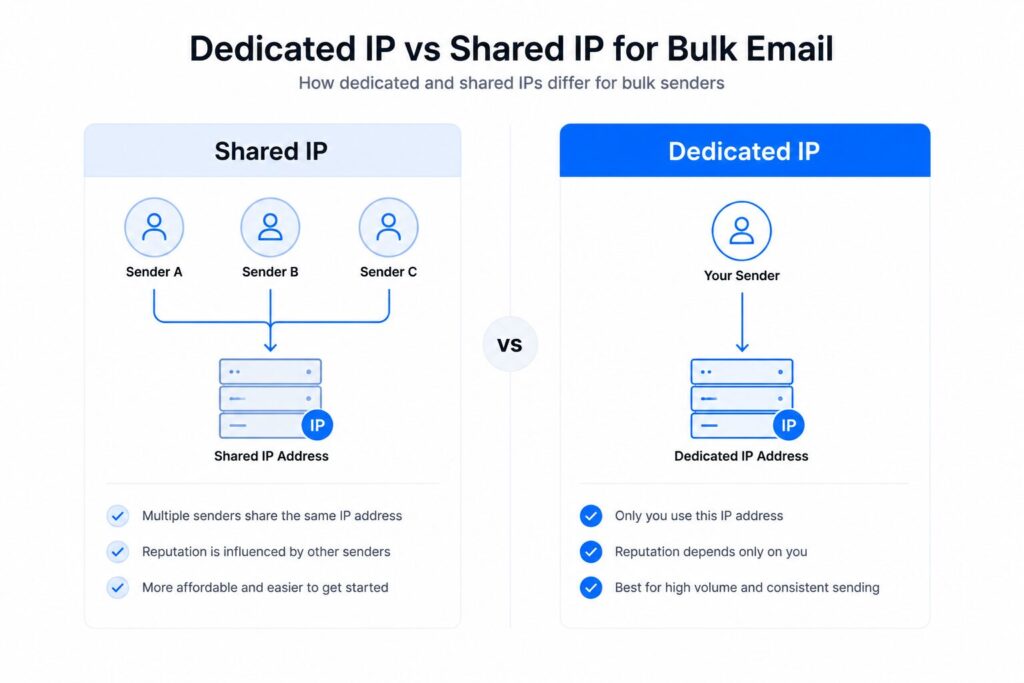
A shared IP sends your email alongside other customers on the same platform. If your monthly sending volume is moderate, generally under 50,000 emails, a shared IP with a strong reputation usually performs well because the provider manages its overall reputation for you.
In contrast, a dedicated IP belongs only to you. As a result, your sender reputation depends entirely on your own list quality and sending practices, whether good or bad. Moreover, dedicated IPs become more valuable as your sending volume increases because your activity no longer affects, or is affected by, other senders sharing the same IP.
Dedicated IP Recommendation Calculator
Enter your estimated monthly email volume to see whether a Shared IP or Dedicated IP is generally the better choice.
Frequently Asked Questions
It depends on your priority. There isn't one universal winner, because the right pick depends on your sending volume, technical comfort, and use case.
Bulk email means sending one message to many recipients at once. Mass email marketing adds automation, segmentation, and triggered sequences on top of that base capability.
Not always. Under roughly 50,000 emails a month, a shared IP with a good reputation usually performs fine. Dedicated IPs matter more once your volume is large enough to affect a shared IP's reputation for other users.
Yes. Brevo, Sender, and Mailjet all support genuine business use on their free plans. They're a reasonable way to validate your strategy before committing to a paid plan.
Sender reputation is tied to your sending domain and IP history, not to a specific platform, so switching tools doesn't erase it outright. That said, a new platform often means a new sending IP, so a short warm-up period is still smart even if your domain reputation is strong.
Not necessarily, but keeping them on separate sending streams or IPs is a best practice.
No. SMTP relay is the underlying protocol and infrastructure used to send email, while bulk email software is the layer on top that adds templates, segmentation, and campaign management.
Key Takeaways
- Bulk email, mass email marketing, and cold outreach solve different problems. Match the tool to your actual use case.
- SPF, DKIM, and DMARC aren’t optional in today. Confirm any tool you’re considering supports full authentication before committing.
- Calculate cost per 1,000 emails at your expected future volume, not your current one.
- Purchased lists hurt deliverability regardless of platform. Build your list through opt-in instead.
- Mass Mail Service, Brevo, Mailtrap, and Omnisend each lead for a different priority: deliverability-first automation, budget-friendly all-in-one, developer infrastructure, and ecommerce, respectively.
If dedicated-IP deliverability and built-in automation matter most to you, check current pricing directly with Mass Mail Service, then compare it against your current tool’s cost per 1,000 emails using the table above. Whichever platform you choose, confirm your domain’s SPF, DKIM, and DMARC setup before your next send.